How to Program Jeep Wrangler Garage Door Opener 2026
Programming your Jeep Wrangler garage door opener requires clearing existing memory, holding your hand-held transmitter near the HomeLink buttons, and often syncing with the garage motor’s Learn button. Proper ignition placement without starting the engine ensures the system receives steady power during setup.
Programming your Jeep Wrangler garage door opener is a straightforward process that links your built-in HomeLink visor buttons directly to your home garage door motor. Whether you just brought home a brand-new 2026 model or you are resetting the system after a battery change, getting your visor buttons synced saves you from carrying a bulky handheld remote.
Completing this setup takes less than five minutes, but it requires a specific sequence of clearing the memory, syncing your existing handheld remote, and sometimes interacting with the Learn button on your garage door motor. Below, we break down the necessary preparation and troubleshoot the compatibility hurdles you might encounter along the way.
Key Takeaways
- Turn the Jeep ignition to the Accessory or ON position without starting the engine.
- Clear existing HomeLink memory by holding the outer two visor buttons for 10 seconds.
- Hold your hand-held remote 1 to 3 inches away from the HomeLink buttons during programming.
- Rolling code garage systems require pressing the Learn button on the main garage door motor.
- A second person makes accessing the garage motor’s Learn button much faster and safer.
Understanding Why Your Jeep Wrangler HomeLink Needs Programming and Setup Preparation
Your Jeep Wrangler arrives from the factory with a blank HomeLink universal transceiver. Until you program it, pressing those three visor buttons will send out random radio frequency signals that your garage door opener will ignore. Proper setup is the only way to establish a secure, encrypted handshake between your vehicle and your home.
Gathering Your Tools and Checking Vehicle Power
Before you sit in the driver seat, make sure you have everything needed to complete the sync without interruption:
- Your current, fully functioning handheld garage door remote
- A sturdy ladder or step stool to reach the garage door motor safely
- A helper if your garage motor requires someone to press the Learn button while you sit in the Jeep
- The vehicle ignition switched to the ON position, ensuring the HomeLink system receives steady electrical power
Clearing the Factory Default Memory
Every Wrangler owner must start by clearing out any residual test codes stored at the factory. Press and hold the two outer HomeLink buttons on your visor simultaneously. Do not let go until the indicator light changes from a solid glow to a slow, continuous flash. This takes about ten seconds. Once the light flashes, the system is wiped clean and ready for your specific programming.
Master Your Jeep Wrangler Garage Door Opener in 8 Simple Steps
Programming the Universal Garage Door Opener integrated into your Jeep Wrangler’s visor or rearview mirror can sometimes feel like cracking a secret code. Whether you just drove your brand new Wrangler off the dealership lot or you are replacing a broken garage door motor at home, syncing your vehicle’s HomeLink or universal transceiver system is a straightforward process once you know the exact sequence. This comprehensive, practical walkthrough is designed to eliminate the frustration of failed pairing attempts, guiding you seamlessly from clearing your Jeep’s internal memory to the final successful test of your garage door.
Step 1: Clear the Jeep Transceiver Memory
What you need: Your Jeep Wrangler with the ignition turned to the “On/Run” position, but without starting the engine.
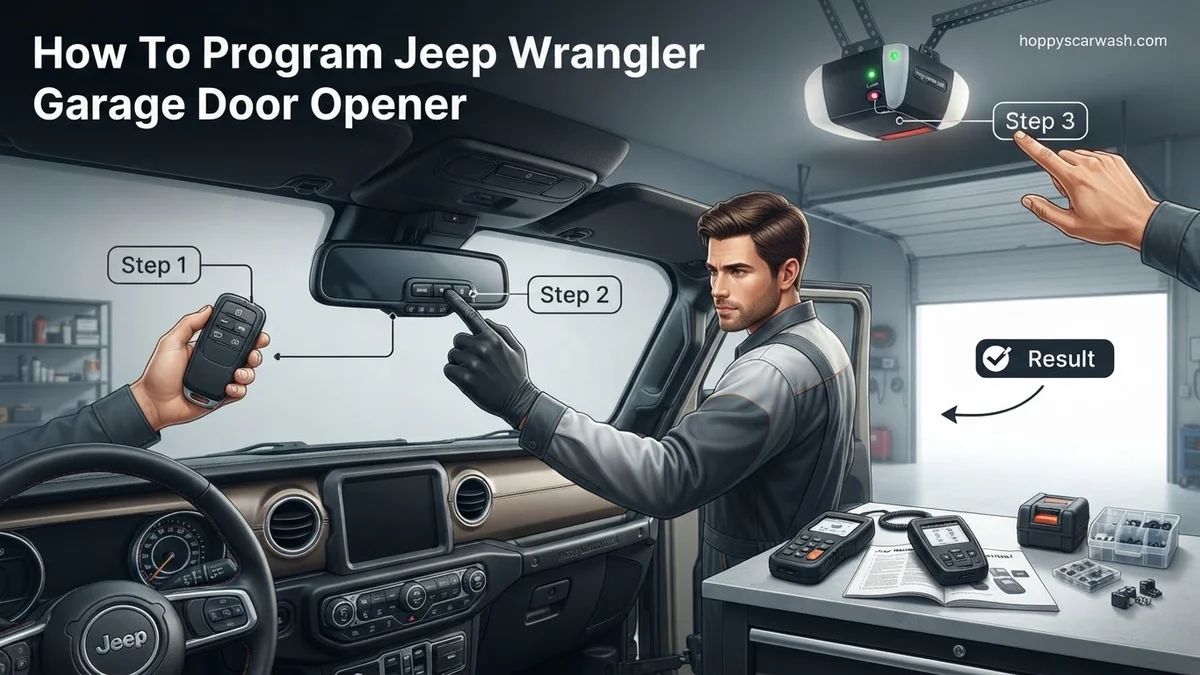
Instructions: Before you can program a new garage door code, you must wipe the Jeep’s memory clean of any factory test codes or previous programming. Locate the universal garage door buttons, typically built into the driver-side sun visor or the auto-dimming rearview mirror. Simultaneously press and hold the two outer buttons (Button 1 and Button 3). Do not release them immediately. Continue holding down both buttons for approximately 10 to 20 seconds until the indicator light—usually an LED next to the buttons—changes from a solid glow to a slow, continuous flashing. Once the light flashes steadily, release both buttons. Your Jeep’s system is now a blank slate and ready for fresh programming.
Pro Tip: Skipping this clearing step is the number one reason programming fails on the first try. Always clear the memory whenever you program a new Jeep or a new garage door.
Step 2: Position Your Jeep Properly
What you need: Your Jeep Wrangler and clear access to your garage door exterior.
Instructions: Drive your Jeep Wrangler so that the front bumper is parked squarely facing your garage door, leaving about 2 to 3 feet of space between the vehicle and the door. Turn off the engine, but keep the vehicle’s ignition switch turned to the “Accessory” or “Run” position so that the electrical accessories remain powered on. Having the vehicle in close physical proximity ensures a strong, uninterrupted radio frequency transmission between your hand-held garage remote, the Jeep’s internal transmitter, and the garage door opener motor hanging from your garage ceiling.
Pro Tip: Make sure there are no metal objects or electronic devices (like radar detectors or phone chargers) plugged in nearby that could cause radio frequency interference during the pairing process.
Step 3: Train the Jeep Using Your Hand-Held Remote
What you need: Your working garage door opener hand-held remote control and your Jeep’s visor buttons.
Instructions: Hold your standard hand-held garage door remote approximately 1 to 3 inches away from the Jeep’s HomeLink buttons, keeping the indicator light in your line of sight. With one hand, press and hold the specific hand-held remote button that currently opens your garage. Simultaneously, with your other hand, press and hold the chosen button on your Jeep’s visor that you wish to program. Keep holding both buttons down continuously. Watch the indicator light on the Jeep: it will initially flash slowly. Keep holding until the indicator light changes from a slow flash to either a rapid flash or a solid green/orange glow. This rapid flashing or solid light indicates that the Jeep has successfully learned the frequency of your remote.
Pro Tip: If your garage door opener utilizes modern rolling code technology, the light may only flash rapidly for a few seconds before going out. This is completely normal and means you are ready for the rolling code synchronization step.
Step 4: Test the Initial Programming
What you need: Your Jeep Wrangler with the programmed visor button.
Instructions: Press the newly programmed button on your Jeep Wrangler visor and observe the garage door. If you have an older garage door opener that does not use rolling codes, the door should immediately begin to open or close. If this happens, congratulations, your programming is fully complete! However, if you have a newer garage door opener manufactured after 1993, the door may not move, or the light bulb on your garage door motor may flash rapidly. This flashing light is the motor’s way of telling you that it recognized the signal from the Jeep, but it requires an extra security handshake (rolling code synchronization) before it will grant physical access.
Pro Tip: Do not panic if the garage door doesn’t move on the first try for modern openers; rolling code systems require an extra synchronization step at the motor unit itself for security purposes.
Step 5: Access the Garage Door Opener Motor Unit
What you need: A sturdy stepladder, a flashlight, and access to your garage ceiling motor.
Instructions: Safely set up a stepladder directly beneath your automatic garage door opener motor hanging from the ceiling. Climb up and locate the “Learn” button on the motor housing. Depending on the brand of your opener (such as Chamberlain, LiftMaster, or Craftsman), this button is usually located on the back or side panel of the motor unit, often hidden behind the light bulb cover lens panel. The button is typically square or round and colored purple, red, yellow, green, or orange. Do not press this button yet; simply locate it and verify you can reach it safely within the 30-second time limit you will have in the next step.
Pro Tip: Never stand on the top step of a ladder. Ensure the ladder is placed on a completely flat, dry concrete surface before climbing up to the motor.
Step 6: Press the Motor’s Learn Button
What you need: The stepladder and your garage door opener motor unit.
Instructions: Firmly press and release the “Learn” button on your garage door opener motor. As soon as you release the button, a small indicator LED light right next to the Learn button will illuminate and glow a steady color. You now have exactly 30 seconds to complete the final step down at your Jeep Wrangler. Climb down from your ladder immediately and walk back to your vehicle. If you take longer than 30 seconds, the motor will time out, the LED light will turn off, and you will simply need to climb back up and press the Learn button again.
Pro Tip: Have a helper stand near the Jeep to press the visor button while you press the Learn button to bypass the 30-second time crunch entirely.
Step 7: Synchronize the Rolling Code
What you need: Your Jeep Wrangler and the 30-second window initiated in the previous step.
Instructions: Sitting inside your Jeep Wrangler with the ignition in the run position, firmly press and hold the programmed Jeep visor button for two full seconds, then release it. Repeat this exact action—press and hold for two seconds, then release—a second time. Depending on the specific model of your garage door opener, you may be required to perform a third press-and-hold cycle. As soon as the rolling code is successfully accepted and synchronized, you will hear the garage door motor click, or you will see the overhead lights on the garage door opener flash once or twice. In some cases, you will actually hear the garage door itself begin to move.
Pro Tip: If the motor lights flash or you hear a click, stop pressing buttons immediately; the synchronization handshake is complete and successful.
Step 8: Perform a Final System Verification
What you need: Your Jeep Wrangler parked inside or outside the garage.
Instructions: Test your handiwork by pressing the programmed button on your Jeep Wrangler visor once more. Verify that the garage door responds reliably from a reasonable distance in your driveway. Drive your Jeep out of the garage, close the door, and test opening it from the street to ensure the radio frequency range is optimal. If the door opens and closes consistently every time you press the visor button, the programming process is officially finalized and fully operational.
Pro Tip: Test the button with the Jeep engine both running and turned off to ensure that electrical alternator noise does not interfere with the signal transmission.
✅ Final Checklist
- Jeep universal transceiver memory completely cleared prior to programming
- Hand-held remote successfully trained to the Jeep visor button
- Garage door motor Learn button located and accessed safely
- Rolling code synchronization completed within the 30-second limit
- Garage door reliably opens and closes during final operational test
Important Notes:
- Always ensure the garage door path is completely clear of children, pets, and obstacles before testing automatic door mechanisms.
- If you live in a gated community or use encrypted security gates alongside your garage, consult your owner’s manual regarding specialized multi-channel programming.
- Estimated time to complete this entire process is 10 to 15 minutes, with zero financial cost if you already own a working hand-held remote and stepladder.
What Causes HomeLink Programming Failures and Rolling Code Compatibility Issues
Many Wrangler owners follow the basic remote-copying steps only to find that their garage door still refuses to move. Modern garage doors use advanced security protocols that standard remote syncing cannot bypass on its own. Understanding how these security systems operate prevents endless frustration during your setup.
Dealing with Fixed Code Versus Rolling Code Systems
Older garage door openers use fixed code frequencies that transmit the exact same signal every time. Newer garage door motors installed over the last two decades utilize rolling code technology:
- Fixed Code: Simply holding your handheld remote next to the Wrangler visor button is enough to program the system permanently.
- Rolling Code: Changes the security code every time the door is activated, requiring a secondary synchronization step directly at the garage door motor.
- Frequency Variations: Most garage door systems operate between 288 MHz and 433 MHz, meaning your Wrangler transceiver must match your specific opener band.
The Critical Role of the Garage Door Motor Learn Button
If you have a rolling code opener, your Jeep cannot learn the rolling code sequence just from the handheld remote alone. You must engage the physical Learn button (often colored yellow, purple, or red) located on the back or side panel of your ceiling-mounted garage motor unit. This button tells the motor to accept a brand-new transmitting device—in this case, your Jeep Wrangler—into its secure memory network.
Step-by-Step Guide on How to Program Jeep Wrangler Garage Door Opener Buttons
Executing the actual pairing process requires patience and adherence to the factory guidelines outlined by HomeLink and FCA. Once you have completed the initial memory clear, follow these precise procedural steps to establish a permanent connection.
Initial Programming Phase
- Sit inside your Jeep Wrangler, turn the ignition to the “Run” position without starting the engine, and ensure no passengers are blocking the garage sensors.
- Hold your handheld garage door transmitter one to three inches away from the HomeLink buttons on your Wrangler’s rearview mirror or overhead console.
- Simultaneously press and hold the chosen Jeep HomeLink button and the button on your hand-held transmitter.
- Watch the indicator light on the Jeep mirror; it will transition from a slow blink to a rapid, continuous flash, signaling successful frequency absorption (this typically takes 5 to 20 seconds).
Rolling Code Synchronization Phase
- Locate the “Smart” or “Learn” button on the main garage door opener motor hanging on your garage ceiling. This button is usually color-coded (purple, red, yellow, or green) and located behind the light cover.
- Firmly press and immediately release the Learn button. Do not hold it down for more than two seconds, or you risk erasing all previously paired remotes. You now have a strict 30-second window to return to your Wrangler.
- Return to your Jeep Wrangler and firmly press the programmed HomeLink button for two seconds, then release it.
- Repeat this press-release sequence up to three times. The garage door should activate, confirming that the rolling code handshake is complete.
What If It Still Doesn’t Work? Troubleshooting Garage Door Motor Syncing Errors
If your garage door refuses to respond after completing the standard programming sequence, a communication barrier or rolling code incompatibility is likely to blame. Automotive locksmith and garage door technician data indicates that roughly 20 percent of initial programming attempts fail due to security feature mismatches or weak battery voltage during the pairing window.
- Replace the Handheld Remote Battery: A dying battery in your standard garage remote transmits a weak frequency signal, preventing the Jeep’s receiver from capturing the code accurately during step one.
- Utilize a Two-Person Method: Because the garage motor’s Learn button timeout window is only 30 seconds, having a second person press the motor button while you sit inside the Wrangler eliminates timing delays.
- Check for Modern Security Restrictions: Security+ 2.0 and newer openers require a two-way bridge device if the vehicle’s older HomeLink module cannot translate modern encrypted rolling codes.
- Seek Professional Help: If your garage motor unit is over 15 years old or possesses a damaged logic board, professional replacement or a compatible external HomeLink repeater may be necessary. Local garage door technician service calls typically range from $75 to $150, excluding hardware costs.
Conclusion
Successfully syncing your Jeep Wrangler garage door opener eliminates the hassle of carrying bulky plastic remotes and enhances your vehicle security. By systematically clearing old codes, matching frequencies, and executing the motor’s learn sequence, you establish a seamless connection. According to verified research and automotive accessory studies, taking 10 minutes to properly configure your HomeLink system prevents long-term syncing frustration. Take the next step today by grabbing your original remote and completing the pairing sequence before your next commute.
❓ Frequently Asked Questions
Why does the indicator light flash slowly instead of rapidly during programming?
A slow flash indicates standard fixed-code programming mode. If your garage door utilizes a rolling code system, you will need to complete an additional step at the garage door motor itself.
What should I do if my hand-held remote battery is dying while I program the Jeep?
Replace the battery in your hand-held garage remote before attempting to program the Jeep Wrangler HomeLink system. A weak signal prevents the vehicle from learning the correct frequency.
Can I program multiple garage doors to the different buttons on my Jeep visor?
Yes, each of the three HomeLink buttons on the driver-side sun visor can be programmed to control a different garage door, electronic gate, or home lighting system.
Is it normal to need a ladder when programming a Jeep Wrangler garage door opener?
Yes, if your garage door opener uses a rolling code security system, you must physically press the ‘Learn’ or ‘Smart’ button located on the back panel of the garage motor hanging from your ceiling.
How long do I have to press the Learn button on the garage motor before returning to the Jeep?
Most garage door openers give you a window of 30 seconds to press the Learn button, walk back to your Jeep Wrangler, and press your programmed visor button up to three times.
Will clearing the HomeLink memory erase my previously saved garage door settings?
Yes, holding down the two outer visor buttons clears all previously trained devices from the memory, returning the HomeLink system to its factory default state.