
What are the Buttons on My Rear View Mirror Toyota: Explained Simply
Have you ever glanced at your Toyota’s rear view mirror and wondered what all those little buttons do? You’re not alone.
Those buttons might seem confusing at first, but they’re designed to make your driving safer and more convenient. Imagine having easy access to important features right at your fingertips, without taking your eyes off the road. Keep reading, and you’ll discover exactly what each button on your Toyota’s rear view mirror does—and how you can use them to improve your driving experience.

Credit: www.toyota.com
Common Buttons On Toyota Rear View Mirrors
Toyota rear view mirrors come with several buttons that add convenience and safety. These buttons control various features that help drivers. Understanding these buttons makes driving easier and more comfortable.
Each button has a specific function. Some control lighting, others help with navigation or security. Knowing what each button does can improve your daily drive.
Homelink Buttons
HomeLink buttons let you control your garage door or gates. They replace your remote controls, so you don’t need to carry extra devices. You can program up to three different devices to these buttons.
Press a button, and your garage door opens automatically. It is a simple way to add security and ease to your home access.
Auto-dimming Feature
The auto-dimming button controls the mirror’s glare reduction. It helps reduce the bright lights from cars behind you at night. This feature adjusts the mirror’s brightness automatically.
It keeps your eyes comfortable and improves night driving safety. You can turn this feature on or off with the button.
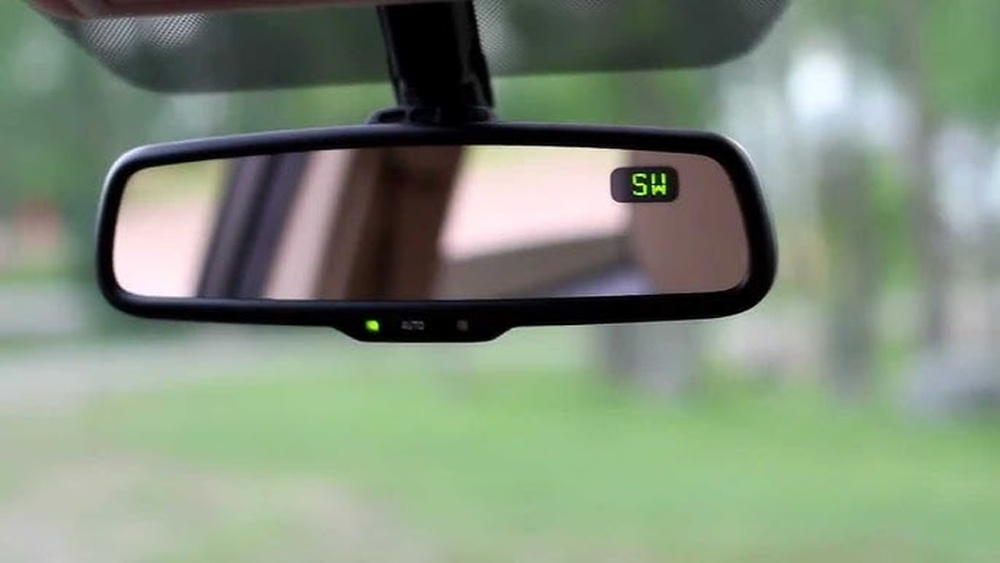
Compass And Temperature Display
Some Toyota mirrors show a small screen with the compass direction and outside temperature. The button lets you switch these displays on or off. It helps you know your direction without looking away from the road.
You can also check the outside temperature, useful for weather awareness. This display is easy to read and updates in real time.
Garage Door Opener
The garage door opener button is part of the HomeLink system but may be separate on some models. It gives quick access to open or close your garage. This button is usually easy to find and press.
It eliminates the need to use a handheld remote. This button adds convenience, especially in bad weather or at night.
How Homelink Buttons Work
The HomeLink buttons on your Toyota’s rearview mirror offer a smart way to control devices like garage doors and gates. These buttons act as a remote control built right into your car. They communicate with compatible devices by sending radio signals. This allows you to open or close your garage door without carrying a separate remote. The system is designed for convenience and safety, helping you keep your hands on the wheel and eyes on the road.
Programming Your Homelink
Start by turning your car’s ignition on. Hold the HomeLink button you want to program. Press your garage door remote button at the same time. Keep both buttons pressed until the HomeLink light changes. This means the signal is learned. Some devices may need extra steps. Follow your Toyota’s manual for specific instructions. Programming is quick and only takes a few minutes.
Operating Garage Doors And Gates
Once programmed, press the HomeLink button to open or close your garage door. The system sends a signal to your device. Your garage door or gate responds as if you used its remote. You can program up to three devices. This means you can control different doors or gates from one place. It makes daily tasks easier and faster.
Resetting And Troubleshooting
Press and hold the two outer HomeLink buttons for 10 seconds. The light will blink fast, showing a reset. Use this to clear old settings. If the button does not work, check the battery in your remote. Make sure your car is close to the garage door. Some devices need a “training” button press on the garage opener. Follow all steps carefully to fix issues quickly.
Using The Auto-dimming Mirror Feature
The auto-dimming mirror feature in your Toyota helps reduce glare from headlights behind you. This function makes driving safer and more comfortable at night. The mirror adjusts its brightness automatically to protect your eyes.
Understanding how to use this feature can improve your driving experience. You can turn it on or off depending on your needs. Let’s explore how to activate it and the benefits it offers while driving at night.
Activating And Deactivating
To activate the auto-dimming feature, press the button on your rearview mirror. A small light usually appears, showing the feature is on. To turn it off, press the same button again. The light will turn off, and the mirror stops dimming automatically.
Some Toyota models activate this feature automatically when the car starts. Check your vehicle manual for details. Manual control lets you choose when to use the auto-dimming mirror.
Benefits While Driving At Night
The auto-dimming mirror reduces glare from headlights behind you. This helps prevent eye strain and keeps your vision clear. It lowers the chance of being blinded by bright lights. This makes night driving safer and less tiring.
The mirror adjusts quickly to changing light conditions. You can focus on the road without distraction. This feature improves your overall comfort and confidence while driving in the dark.

Credit: www.reddit.com
Additional Features And Tips
The buttons on your Toyota’s rear view mirror offer useful features. They help improve driving comfort and safety. Knowing how to use these buttons can make your drive easier and more pleasant.
These buttons control various functions like auto-dimming, compass display, and emergency assistance. Small adjustments can make a big difference in your driving experience. Here are some tips and features you should know about.
Power Button Functions
The power button turns the auto-dimming feature on and off. This feature reduces glare from headlights behind you. Press the button once to activate or deactivate it. The button may also control other functions depending on your model. Check your owner’s manual for specific details.
Adjusting Display Settings
Your mirror may show a compass or temperature reading. Use the buttons to switch these displays on or off. Some models let you calibrate the compass for accuracy. Press the display button to cycle through options. Hold it to reset or adjust settings as needed.
Maintaining Your Rear View Mirror
Keep the mirror clean for clear vision. Use a soft cloth and glass cleaner. Avoid harsh chemicals that can damage the surface. Check the buttons regularly to ensure they work well. Report any malfunction to your Toyota service center promptly.

Credit: www.bobsmirrors.com
Frequently Asked Questions
What Do The Buttons On A Toyota Rear View Mirror Do?
The buttons control features like garage door openers and emergency assistance. They help you use these functions without extra devices. Each button has a specific purpose for convenience and safety.
How Do I Program My Toyota Rear View Mirror Buttons?
Press and hold the desired button while near your garage remote. Wait for the light to blink, then release the button. This links the mirror button to your garage or home system.
Can Rear View Mirror Buttons Help In Emergencies?
Yes, some Toyota mirrors have emergency call buttons. Pressing them connects you to roadside help quickly. It offers added safety during car troubles or accidents.
Why Is My Toyota Mirror Button Not Working?
The button might need reprogramming or battery replacement in linked devices. Check the owner’s manual for reset steps. Sometimes, a quick reset fixes the issue.
Conclusion
Now you know what each button on your Toyota’s rear view mirror does. These buttons help with safety and convenience while driving. Use them to make calls, get directions, or call for help. Knowing their functions makes your drive easier and safer.
Check your mirror often and feel confident using these features. Enjoy a smoother, safer ride every time you get behind the wheel.



One Comment