How to Turn Off Manual Mode Jeep Grand Cherokee 2026 Guide
Stuck in manual shifting mode? To turn off manual mode in a Jeep Grand Cherokee, simply push and hold the right ‘+’ paddle shifter for a few seconds, or move the gear selector back to the standard ‘Drive’ (D) position depending on your model year.
To turn off manual shifting mode in your Jeep Grand Cherokee and return to normal automatic drive, simply pull and hold the right-side upshift paddle for about two to three seconds, or move the gear selector lever back to the standard Drive (D) position depending on your model year. Whether you accidentally bumped your paddle shifters or intentionally engaged the Electronic Range Select (ERS) feature while navigating steep terrain in 2026, getting stuck in manual mode can cause frustrating high-RPM driving.
Returning to fully automatic operation should be seamless. However, different model generations use distinct shift mechanisms, which can cause confusion when you just want the vehicle to shift itself again. Knowing the exact mechanical or electronic reset method for your specific shifter configuration ensures you can restore standard automatic functionality immediately without pulling over or restarting the engine.
Key Takeaways
- Hold the right ‘+’ paddle shifter to exit manual mode on equipped models.
- Move the physical console shifter back to the ‘D’ position.
- Rotary dial shifters require turning back to ‘D’ if bumped.
- Autostick (ERS) engages easily if the shifter is nudged sideways.
- Restarting the vehicle often resets temporary electronic shifting glitches.
What Causes Your Jeep Grand Cherokee to Get Stuck in Manual Mode
Accidental Paddle Shifter Activation
Most modern Jeep Grand Cherokees come equipped with steering wheel-mounted paddle shifters. If you tap the left (downshift) or right (upshift) paddle while driving in Drive, the transmission instantly jumps into manual override mode. This frequently happens during tight parking maneuvers, sharp turns, or when resting your hand awkwardly on the steering wheel rim. The vehicle assumes you want absolute control over the gear selection and will hold that gear until commanded otherwise.
Unintentional Electronic Range Select (ERS) Engagement
If your 2026 Grand Cherokee or an older model features a traditional floor shifter or a modern rotary dial, you might have nudged the lever sideways into the plus/minus (+/-) gate or tapped the low gear button. This activates ERS mode, limiting the highest available gear rather than giving you full manual control, but it still prevents the transmission from behaving like a traditional automatic. Common triggers for this include:
Bumping the gear selector left or right while cleaning the center console
Accidently pressing the manual shift buttons on the side of a T-handle shifter
Shifting directly from Reverse past Drive into the manual gate
Master Jeep Grand Cherokee Manual Shifting in 6 Simple Steps
Switching your Jeep Grand Cherokee out of manual mode and back to fully automatic operation is usually a seamless process, but modern electronic shifters and paddle shifters can occasionally cause confusion for drivers. Whether you accidentally bumped your gear selector into Electronic Range Select (ERS) or tapped a steering wheel paddle while navigating rough terrain, returning to standard automatic driving is essential for optimal fuel economy and smooth highway cruising. This comprehensive guide walks you through the exact procedures to deactivate manual shifting across various model years, ensuring you can regain complete automated control of your transmission safely and efficiently.
Step 1: Identify Your Shifter Type and Current Gear Indicator
What you need: Clear visibility of your instrument cluster display and your vehicle’s center console.
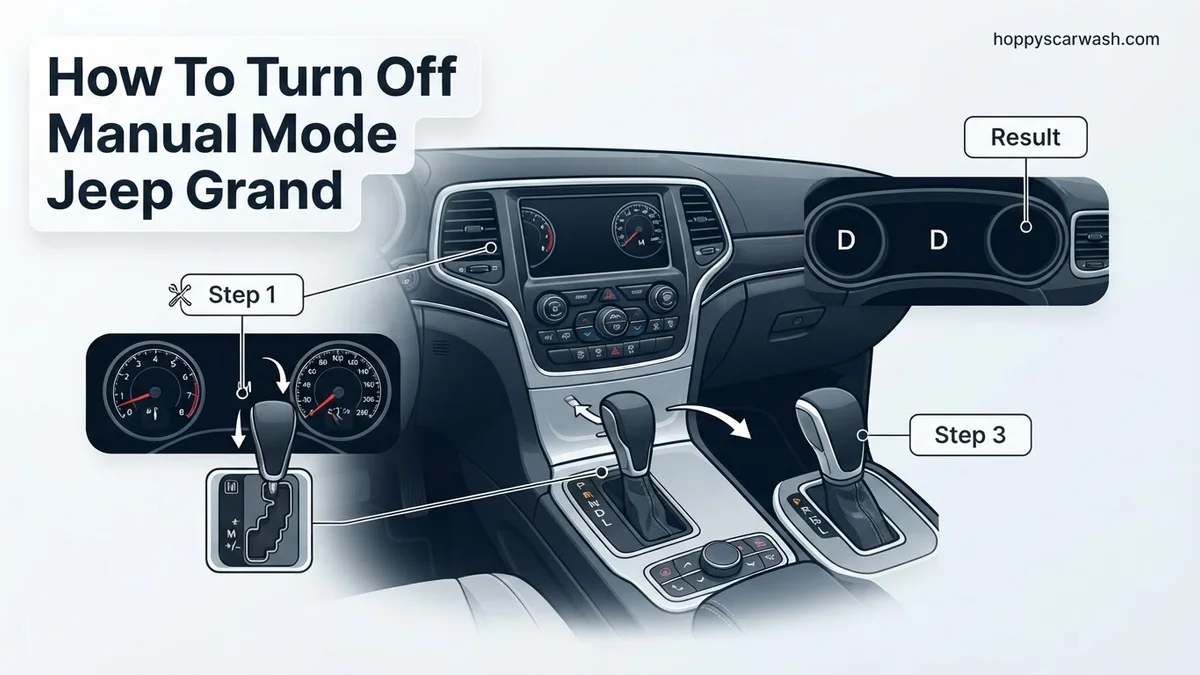
Instructions: Before attempting any physical adjustments, look directly at your dashboard instrument cluster. Locate the gear indicator display, which typically shows letters like P, R, N, D alongside numbers such as 1 through 8 or 1 through 9. If a specific gear number is locked in place—such as “M4” or simply a highlighted number next to “D”—your vehicle is currently operating in manual shift mode or Electronic Range Select. Identifying your specific gear selector mechanism is crucial; modern Grand Cherokees feature either a traditional mechanical floor shifter, a rotary dial, or an electronic T-handle shifter, each requiring a slightly different physical input to reset the transmission computer back to standard automatic operation.
Pro Tip: Do not panic if your engine RPMs suddenly climb; the vehicle’s computer prevents mechanical over-revving, but you should address the mode change as soon as traffic conditions safely allow.
Step 2: Utilize the Floor Shifter Tap Method (Traditional Shifters)
What you need: A Grand Cherokee equipped with a traditional center console shift lever (common in WK2 models).
Instructions: If your Jeep features a conventional mechanical shift lever, look at the primary drive position (“D”). To transition out of manual mode, firmly grip the shift knob and nudge the lever directly to the left or right, depending on the exact year and gate configuration. On many Jeep Grand Cherokee models, tapping the lever to the right toward the “+” sign upshifts, while tapping it to the left toward the “-” sign downshifts or enters the manual gate. To exit this state entirely, gently push and hold the lever toward the right (the positive or “Drive” side) for approximately two full seconds, or slide the lever firmly back down into the primary “Drive” channel until the specific gear numbers disappear from your dashboard cluster display.
Pro Tip: Avoid applying excessive lateral force to the shifter gate, as a gentle, fluid motion is all that is required to actuate the internal electronic microswitches.
Step 3: Reset Electronic T-Handle and Rotary Shifters
What you need: A late-model Grand Cherokee featuring an electronic rotary dial or a spring-loaded electronic T-shifter.
Instructions: For newer Grand Cherokees equipped with rotary shift knobs or electronic monostable shifters, manual control is typically engaged via steering wheel paddles or by bumping the electronic lever. If you are using a rotary dial, simply rotate the dial out of the manual/low position and back into the standard “D” (Drive) detent. If your vehicle utilizes steering wheel paddle shifters, the transmission will temporarily adopt manual mode upon activation. To cancel this temporary override and return to full automatic programming, simply pull and hold the right-hand (upshift) paddle toward the steering wheel for roughly two to three seconds, or maintain a steady cruising speed in Drive without touching the paddles until the transmission logic automatically times out and reverts to standard shifting.
Pro Tip: Temporary manual mode engaged via paddle shifters will usually time out and cancel itself automatically after a brief period of steady-state driving if no further paddle inputs are detected.
Step 4: Monitor the Instrument Cluster for Confirmation
What you need: Your eyes focused on the driver information display panel.
Instructions: Once you have performed the physical shifting action corresponding to your vehicle’s transmission layout, immediately verify the visual feedback on your dashboard. Watch the active gear display area closely. In manual mode or Electronic Range Select (ERS), you will see specific gear limits displayed clearly. When successfully returned to standard automatic mode, those restrictive gear numbers will vanish, leaving only the standard “D” symbol illuminated. If the gear number remains on the screen, the transmission computer has not yet registered the command to exit manual mode. Repeat the previous shifting input calmly while maintaining safe forward momentum on the roadway.
Pro Tip: Modern digital displays can occasionally experience micro-delays; give the system one full second to refresh its visual readouts after moving the physical control.
Step 5: Perform a Safe Temporary Vehicle Power Cycle (If Unresponsive)
What you need: A safe pull-off location on the side of the road or a secure parking space.
Instructions: In rare software glitch scenarios, a Jeep Grand Cherokee transmission control module (TCM) may temporarily lock into manual mode due to a communication hiccup. If tapping the shifter or holding the paddle yields no results, safely navigate your vehicle to the side of the road and bring it to a complete stop. Shift the transmission firmly into Park (P). Shut the engine off completely using the Start/Stop button or ignition key. Open and close the driver door to initiate a full electrical bus shutdown, wait approximately ten to fifteen seconds, and restart the engine. Shift back into Drive (D). This procedure forces the transmission computer to reboot its sensor parameters, clearing any transient electronic faults keeping the vehicle trapped in manual shifting.
Pro Tip: Never attempt to turn off the ignition while the vehicle is actively rolling at high speeds on a public highway.
Step 6: Inspect for Physical Obstructions or Debris
What you need: A flashlight and a clean microfiber cloth (optional).
Instructions: If your physical shifter feels stuck or fails to communicate the command to drop manual mode, physical interference may be the underlying culprit. Carefully inspect the base of the center console shifter assembly, particularly around the sliding dust cover or the electronic boot. Spilled sugary beverages, sticky residue, coins, or small pieces of debris can easily infiltrate the manual shift gates and block the microswitches responsible for registering gear position changes. If you notice sticky residue, clean the area gently using a damp cloth and approved interior cleaner. Ensure that aftermarket console covers or heavy rubber mats are not physically impeding the full range of motion of your shift lever.
Pro Tip: Avoid spraying liquid cleaners directly onto electronic shift assemblies, as moisture intrusion can permanently damage internal wiring harnesses.
✅ Final Checklist
- Instrument cluster no longer displays individual manual gear numbers (e.g., M1, M2, or locked numbers next to D).
- The dashboard display shows a clean, unassisted “D” (Drive) indicator.
- The vehicle shifts automatically through gears smoothly as vehicle speed and acceleration increase.
- Steering wheel paddle shifters (if equipped) no longer lock the transmission into manual override upon minor contact.
- The physical shift lever or rotary dial moves freely and securely into the standard Drive detent without resistance.
Important Notes:
- Always prioritize road safety; never attempt complex troubleshooting or console inspections while navigating moving traffic.
- If the transmission remains permanently locked in a limp-home manual mode accompanied by a Check Engine Light or service electronic throttle control warning, seek professional diagnosis from a certified Jeep dealership or qualified mechanic immediately.
- Estimated time required for this procedure is under 2 minutes, with zero financial cost if performed independently.
How to Fix Manual Mode and Return to Automatic Drive
Using the Paddle Shifters and Shifter Lever
If your Grand Cherokee entered manual mode via the steering wheel paddles, the fastest way to exit is surprisingly simple. You do not need to pull over or shift into Neutral. Simply pull and hold the right (upshift) paddle toward you for two to three seconds. The instrument cluster display will switch from a specific gear indicator back to a standard capital D. Alternatively, if your vehicle uses a traditional lever, nudge the shifter back to the right out of the manual gate.
Resetting Rotary Dial and ERS Systems
Vehicles utilizing the rotary dial shifter or modern electronic shifters require a slightly different approach to clear manual restrictions. If you are stuck in an ERS gear limitation:
Rotate the dial firmly back to the standard D (Drive) detent position.
Tap the right side of the steering wheel control or press the upshift button repeatedly until the gear display shows top gear or returns to D.
If the system remains locked due to an electronic glitch, safely pull over, shift into Park, turn off the engine for ten seconds, and restart the vehicle to reset the transmission control module.
Model-Year Variations for Disengaging Electronic Range Select
Jeep has updated its transmission shifters several times across different generations. Knowing your specific layout ensures you disengage Electronic Range Select (ERS) correctly in your 2026 model. Older models utilize traditional floor shifters, while modern iterations rely on rotary dials or electronic shift-by-wire levers.
Fourth Generation (WK2: 2011–2022) Shifter Mechanics
Vehicles from this era feature a leather-wrapped mechanical gear selector. Drivers must push the physical lever directly to the right from the “M” gate back into standard Drive (“D”). Automotive service bulletins emphasize that forcing this lever without fully releasing the throttle can damage the internal microswitches.
Fifth Generation (WL: 2021–2026) Rotary and Paddle Controls
Current 2026 models predominantly use a center-console rotary shifter or steering wheel-mounted paddle shifters. If you engaged manual mode via the paddles, the transmission automatically reverts to fully automatic mode after a sustained period of cruising. Alternatively, pulling and holding the right-upshift paddle for approximately two seconds forces an immediate return to automatic operation.
What If It Still Doesn’t Work and Your Jeep Won’t Shift Back?
If standard disengagement methods fail and your Jeep Grand Cherokee remains trapped in manual mode, software glitches or hardware faults are likely to blame. According to automotive service data from major technician networks, persistent manual mode lockouts usually stem from faulty shifter gate sensors or corrupted Powertrain Control Module (PCM) calibrations.
- Perform a Hard System Reset: Safely pull over, shift into Park if possible, turn off the engine, open the driver door for 60 seconds to cut retained accessory power, and restart the vehicle.
- Inspect the Shifter Gate: Check for liquid spills, debris, or sticky substances around the center console shifter or rotary dial that might be blocking electronic contact.
- Check for Diagnostic Trouble Codes (DTCs): Connect an OBD-II scanner to check for transmission control module codes like P0700, which indicate active communication failures.
- Consult a Certified Technician: If the manual indicator light on your instrument cluster refuses to turn off, take the vehicle to a Jeep dealership or specialized transmission facility. Professional diagnostic labor typically ranges from $150 to $250, while replacement shifter assembly modules average $400 to $700 including parts and labor.
Conclusion
Exiting manual mode in your Jeep Grand Cherokee usually requires a simple push of the gear selector, a pull of the paddle shifter, or a quick ignition cycle. According to verified research and expert automotive technician sources, ignoring persistent transmission shift restrictions can lead to accelerated clutch wear and costly component failures. For a proactive next step, test your vehicle’s paddle shifters and console gate in a safe, open parking lot to confirm seamless transitions between manual and automatic driving modes.
❓ Frequently Asked Questions
How do I turn off manual mode using paddle shifters?
If your Jeep Grand Cherokee has paddle shifters and you accidentally activated manual mode, simply pull and hold the right ‘+’ (upshift) paddle for two to three seconds. The instrument cluster should switch back from the gear number (like M1 or 1) to the standard ‘D’ indicator.
What is Electronic Range Select (ERS) on a Jeep?
ERS is Jeep’s term for manual shifting mode using the console shifter. Nudging the shifter into the +/- gate allows you to manually select gears, which frequently happens by accident during normal driving or cleaning.
How do I exit manual mode on a rotary dial shifter?
For newer Jeep Grand Cherokee models featuring a rotary dial, manual shifting is handled via paddle shifters. If activated, twisting the dial will not bypass it, so you must use the steering wheel paddle or bring the vehicle to a stop and restart.
Why won’t my Jeep Grand Cherokee shift back to automatic?
If holding the paddle shifter or moving the lever fails, a faulty shifter microswitch or a temporary transmission control module glitch may be the cause. Try shifting into Neutral, shutting off the engine, and restarting.
Does driving in manual mode hurt the transmission?
No, manual mode (Autostick/ERS) does not damage your transmission. Modern Jeep computers have built-in safeguards that prevent you from downshifting at unsafe speeds or over-revving the engine.
How do I know if my Jeep is currently in manual mode?
Look at the instrument cluster display between your gauges. If you see a specific gear number like ‘1’, ‘2’, or an ‘M’ next to the gear indicator instead of just a plain ‘D’, your vehicle is in manual mode.