How to Unlock Ford F150 with Keys Locked Inside 2026
Finding yourself locked out of your truck is frustrating, but several methods can restore access quickly. Using tech features like the FordPass app or SecuriCode keypad is the fastest solution, while physical wedge and reach tools serve as reliable backups.
Standing outside your Ford F-150 with the keys mocking you from the center console or driver seat is an intensely frustrating experience. Whether you are running late for a job site or stranded in a grocery store parking lot, you need a fast, practical solution to get your truck door open without destroying your windows or weather stripping.
Fortunately, modern trucks offer multiple digital and physical pathways to regain entry. From utilizing built-in factory technology to employing careful DIY mechanical bypass methods, you can often bypass the locked doors in minutes without paying for an expensive locksmith service.
Key Takeaways
- Check the FordPass smartphone app to unlock doors remotely via cellular signal.
- Enter your 5-digit factory code on the driver’s door SecuriCode keypad.
- Use an inflatable air wedge and a long reach rod carefully to avoid paint damage.
- Contact Ford Roadside Assistance if your vehicle warranty or roadside plan is active.
- Call a professional automotive locksmith to safely bypass modern electronic security systems.
Why Ford F-150 Lockouts Happen and Common Vulnerabilities
Understanding how modern truck security features inadvertently trap you outside can help you prevent future incidents. In a 2026 model F-150 packed with automation, standard conveniences often lead to accidental lockouts.
Accidental Auto-Lock Triggers
Most modern F-150s feature configurable auto-lock settings that engage once you shift out of park or reach a certain speed. However, system glitches or custom key fob settings can occasionally trigger an immediate lock cycle while you are standing right outside the door.
-
Common auto-lock scenarios:
- Dropping your key fob into a bag or tool chest tossed onto the rear floorboards.
- Unintentional button presses on the physical key fob while it sits in your pocket.
- Proximity sensor confusion when a secondary key is left inside the cabin.
Key Fob Battery and Signal Failure
Passive entry systems rely on constant communication between your key fob and the truck’s internal antennas. If your fob battery dies while it rests inside the cab, the security module may fail to recognize the authorized signal, refusing to unlock the doors even when you touch the exterior handle. Recognizing these vulnerabilities allows you to pivot quickly to the right recovery method.
Unlocking Your Ford F-150 Made Easy: Your Essential Action Plan
Finding yourself locked out of your Ford F-150 can quickly ruin your day, whether you are running late for work or stranded in a parking lot. This comprehensive practical walkthrough is designed to help you regain access to your vehicle safely and efficiently without causing permanent damage to the weatherstripping, window glass, or interior electronics. By following these structured, professional-grade techniques—ranging from modern digital overrides to traditional mechanical methods—you will be back in the driver’s seat in no time.
Step 1: Assess and Verify All Access Points
What you need: Keen eyesight, patience, and a flashlight if working at night.
Instructions: Before attempting any forceful entry or gathering tools, take a slow walk around your Ford F-150. It is surprisingly common for a rear passenger door, the tailgate, or the sliding rear window (if manually latched or power-operated with a slight gap) to be left unlocked. Check every single door handle, including the passenger side and the keypad on the driver’s door if your trim level is equipped with SecuriCode. Give each door a gentle pull rather than just looking at the handle, as an interior latch may be partially engaged.
Pro Tip: Never break a window as an absolute first resort; always exhaust every door and window check first to save hundreds of dollars in glass replacement costs.
Step 2: Utilize the FordPass Smartphone Application
What you need: A smartphone with cellular data and the FordPass app installed and previously paired to your vehicle.
Instructions: If you have a relatively modern Ford F-150 (typically 2018 models and newer), your smartphone is your best friend. Pull out your phone and open the FordPass application. Log into your account if prompted. Navigate to the vehicle control screen where you will see virtual buttons for starting, locking, and unlocking your truck. Tap the unlock icon. The app will send a secure cellular command to your vehicle’s modem, which will flash the lights and pop the door locks open within 10 to 30 seconds, depending on your cellular signal strength.
Pro Tip: If your phone is locked inside the truck with your keys, ask a family member or friend to log into your FordPass account on their phone or call the Ford Customer Relationship Center for remote unlock assistance.
Step 3: Enter the SecuriCode Keyless Entry Keypad Code
What you need: Your factory 5-digit master entry code (usually found on a white card in your owner’s manual packet).
Instructions: Many Ford F-150 trucks feature the SecuriCode invisible keypad on the driver’s side B-pillar. If your truck has this feature, firmly press the buttons on the keypad to illuminate them. Enter your personal 5-digit code. Within 5 seconds of entering the code, press the 3/4 button to unlock the driver’s door, or the 5/6 button to unlock all doors and the tailgate. If you have forgotten your code and locked it in the glove box, check your FordPass app or the physical plastic wallet card that came with the purchase paperwork.
Pro Tip: Entering the 7/8 and 9/0 buttons simultaneously after your master code will lock all doors, so ensure you only press the designated unlocking sequence.
Step 4: Create a Small Gap Using an Inflatable Wedge
What you need: A professional automotive air wedge pump bag and a non-marring plastic trim removal tool or wooden wedge.
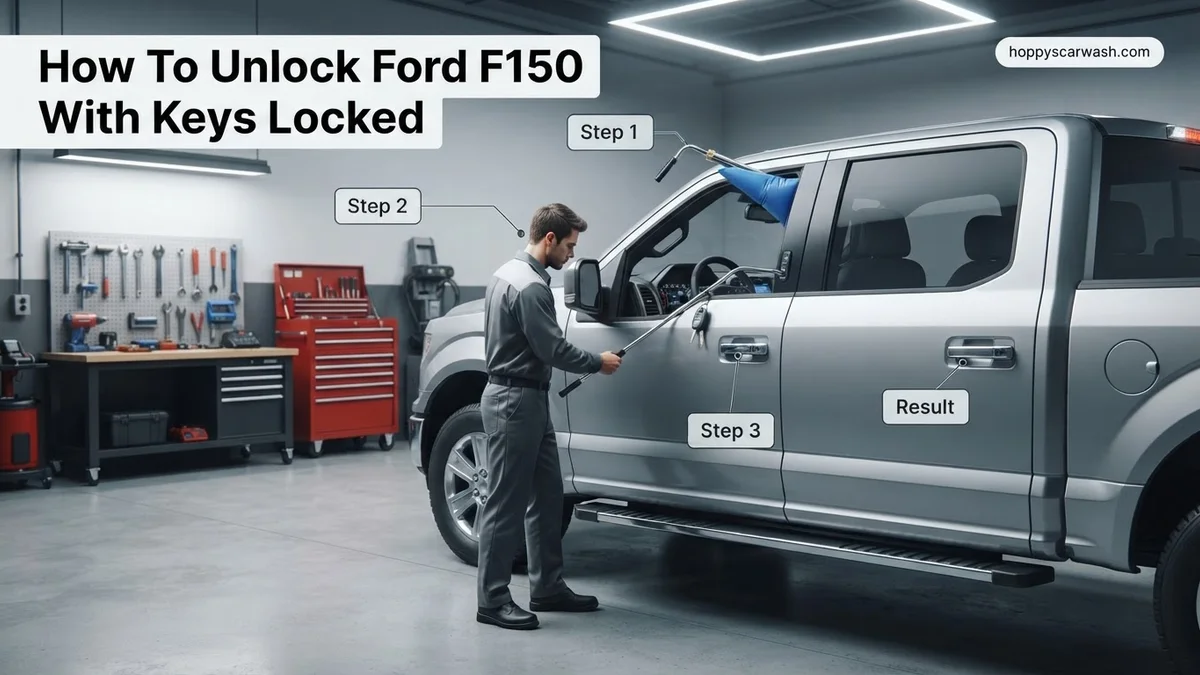
Instructions: If digital methods fail, you must gently wedge the top corner of the driver’s side door frame. Carefully insert the plastic trim tool between the rubber weatherstripping and the painted metal frame at the top corner of the door, roughly 6 inches down from the roofline. Pry gently—no more than a quarter-inch—just enough to slide the deflated fabric air wedge into the gap. Using the hand pump bulb, slowly inflate the air bag. Stop pumping as soon as a gap of approximately 3/8 inch is created between the door frame and the body.
Pro Tip: Do not over-inflate the air wedge, as excessive pressure can bend the aluminum or steel door frame or crack the side window glass.
Step 5: Bypass the Lock Using a Long Reach Rod
What you need: A specialized long-reach recovery tool rod, a coat hanger, or a rigid wooden dowel at least 4 feet in length.
Instructions: Carefully feed your long-reach rod through the gap created by the air wedge. Maneuver the tip of the tool toward the interior of the F-150 cabin. Depending on your model year, aim for one of three targets: the power unlock button located on the driver’s door armrest, the interior mechanical door handle (pulling it twice on modern F-150s will open the door), or the automatic window switch if the ignition is still somehow energized. Gently press or pull the target mechanism with the tip of your rod until the locks disengage.
Pro Tip: Wrap the end of a DIY coat hanger in electrical tape to prevent scratching your truck’s interior door panel or leather armrest.
Step 6: Safely Retract Tools and Inspect the Door
What you need: Your hands and a microfiber cloth.
Instructions: Once the door is successfully unlocked, immediately reverse the entry process. Deflate the air wedge completely by turning the release valve on the hand pump. Pull the air wedge out from the door frame. Use your plastic trim tool to ensure the rubber weatherstripping is fully seated back into its original metal channel along the door frame. Open and close the driver’s door a few times to verify the latch operates smoothly and that no permanent wind noise or water leaks will occur due to a misaligned frame.
Pro Tip: Wipe down the painted surface with a microfiber cloth to remove any smudges or oils left behind by your tools.
✅ Final Checklist
- All doors open and interior locks function properly using the master switch
- Weatherstripping is completely seated with no gaps or pinches
- Windows roll up and down smoothly without catching on the frame
- Keys retrieved from inside the cabin and accounted for
- Vehicle security alarms disarmed and engine running normally
Important Notes:
- Never use rigid metal screwdrivers directly against painted metal surfaces without heavy padding, as permanent scratches and chipping will occur.
- If your F-150 features laminated acoustic glass or you are uncomfortable manipulating the door frame, call a certified local locksmith or roadside assistance provider immediately.
- Estimated professional locksmith service cost ranges from $75 to $150, taking approximately 15 to 30 minutes to complete safely.
How to Use the FordPass App and SecuriCode Keypad to Unlock Your Truck
Before you even think about reaching for a coat hanger or wedge tool, check for the digital lifelines built directly into your Ford F-150. These technological features offer the cleanest, damage-free entry possible.
Unlocking via the FordPass Smartphone App
If you have a cellular data connection and set up the FordPass application prior to 2026, your smartphone acts as an instant digital master key. Open the app on your mobile device, navigate to the vehicle control screen, and press and hold the virtual unlock button. The system sends an encrypted cellular command to your truck’s modem, popping the locks within seconds.
-
Requirements for app unlocking:
- Active cellular signal for both your phone and the truck’s built-in modem.
- Prior pairing of your smartphone to your specific VIN in the FordPass ecosystem.
- Sufficient battery life on your mobile device.
Using the SecuriCode Invisible Keypad
Many trim levels of the F-150 feature the classic SecuriCode invisible keypad embedded on the driver-side door pillar. If you programmed a personal 5-digit entry code, simply touch the surface to illuminate the buttons and input your code. Pressing the 3/4 button immediately unlocks the driver door, while pressing the 7/8 and 9/0 buttons simultaneously unlocks all remaining passenger doors.
Step-by-Step Guide to Using an Air Wedge and Reach Tool Without Damage
When electronic bypass methods fail on your Ford F-150, mechanical intervention using an air wedge and a long reach tool remains the industry standard for safe entry. Automotive locksmith data shows that using a non-marring plastic wedge combined with a vinyl-coated rod prevents paint scratches and weather-stripping tears.
Preparing the Door Frame
- Inspect the top corner of the driver-side door frame for existing alignment issues or aftermarket window visors.
- Insert the deflated air wedge approximately two inches from the top corner, sliding it gently between the weather stripping and the glass.
- Inflate the hand pump gradually until a gap of roughly one-quarter inch forms, ensuring you do not over-pressurize and shatter the laminated glass standard on 2026 F-150 models.
Executing the Unlock Sequence
- Insert the coated reach tool through the created gap, keeping the business end pointed downward toward the interior cabin.
- Navigate the tip past the steering column toward the driver-side door panel where the master unlock switch is located.
- Depress the unlock button or gently pull the interior door handle to release the latch mechanism and open the door.
What to Do When DIY Methods Fail and Professional Assistance Is Needed
Sometimes standard bypass techniques and manual wedge tools fail due to high-security deadlocking features or tight factory tolerances on newer truck models. Knowing when to escalate saves time and prevents costly body damage.
What If It Still Doesn’t Work?
- Verify that your FordPass app connection is completely down and that remote server requests are timing out before abandoning digital options.
- Contact Ford Roadside Assistance if your vehicle is under factory warranty, as lockout services are typically covered at zero out-of-pocket cost.
- Call a certified automotive locksmith who utilizes specialized high-security decoders, with professional service fees typically ranging from $75 to $150 depending on your exact location.
- In extreme emergency situations involving pets or children trapped inside, immediately call 911 for emergency rescue personnel assistance.
Conclusion
Getting locked out of your Ford F-150 can disrupt your schedule, but modern digital overrides, app-based connectivity, and careful mechanical entry tools provide reliable solutions. According to verified research and automotive locksmith associations, utilizing official manufacturer remote services or professional assistance remains the safest way to prevent costly vehicle damage. For your immediate next step, verify your FordPass app status or contact a local certified locksmith to get back on the road safely today.
❓ Frequently Asked Questions
How does the FordPass app unlock my truck if the keys are inside?
The FordPass app connects to your vehicle via cellular networks. As long as your truck has cellular coverage and an active data connection, hitting the remote unlock button inside the app sends a signal to pop the locks.
What should I do if my SecuriCode keypad is not working?
If the exterior keypad fails to respond, it may be due to a dead vehicle battery or a blown fuse. In this scenario, you will need to rely on roadside assistance or a physical lockout tool.
Is it safe to slide a slim jim into a newer Ford F-150?
Traditional slim jims should never be used on modern Ford F-150 models because they easily snag and break internal wiring harnesses, side airbag sensors, and power window mechanisms.
How much does an automotive locksmith typically charge to unlock a truck?
An emergency automotive locksmith usually charges between $75 and $150 depending on your location, the time of day, and the specific security complexity of your Ford F-150 model year.
Can I program a secondary master code on the door keypad?
Yes, you can easily program a personal 5-digit secondary code by entering your factory master code first, pressing the 1/2 button, entering your new code, and saving it.
What precautions protect my truck’s weather stripping during a wedge unlock?
Always wrap the tip of your pry tool or use a specialized plastic wedge paired with a fabric-shielded air bladder to prevent tearing the soft rubber seals around the door frame.