How Does Audi A6 3.0T Have Launch Control Works Audi 2026
The Audi A6 3.0T launch control system enables maximum acceleration by precisely managing engine RPM, boost pressure, and clutch engagement. Activating it requires putting the car in Dynamic mode, disabling traction control, and executing a strict pedal sequence. Understanding the underlying electronics prevents excessive drivetrain shock and wheel spin.
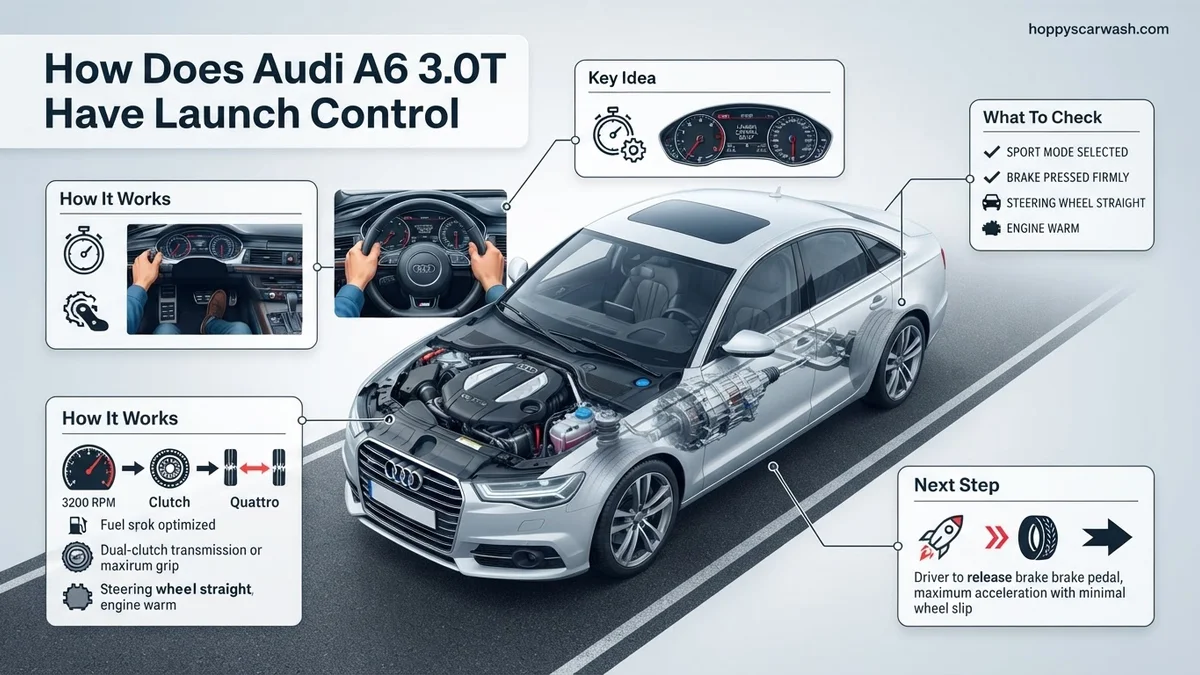
Activating launch control in your Audi A6 3.0T transforms your executive sedan into a straight-line performer by combining precise electronic throttle management, transmission clutch pre-loading, and stability control calibration. When executed correctly, the system drops the hammer off the line, letting the supercharged or turbocharged V6 engine deliver maximum torque without instantly melting your tires or destroying the dual-clutch transmission.
Understanding the exact sequence matters because missing a single step leaves you with standard acceleration and a sluggish takeoff. Whether you are hitting an empty stretch of pavement in 2026 or testing your car at a local track day, mastering this technique unlocks the full mechanical potential of your powertrain.
Key Takeaways
- Engage Dynamic mode through the Audi drive select system.
- Press the traction control button once to activate Sport mode.
- Hold the brake pedal down firmly with your left foot.
- Floor the accelerator pedal completely past the kickdown switch.
- Release the brake pedal quickly to execute the launch.
What Causes Launch Control Failure in an Audi A6 3.0T
Drivetrain Temperature and Protection Limits
Your Audi A6 3.0T relies on complex electronic safeguards to prevent catastrophic mechanical failure. If your transmission fluid or engine oil temperatures are outside the optimal operating window, the ECU will quietly disable launch control.
- Transmission fluid must sit between 60°C and 100°C for the clutches to safely handle the hydraulic pressure spikes.
- Engine coolant needs to reach standard operating temperature; cold-start protection routines block high-RPM stationary revving.
- Repeated back-to-back launches trigger thermal protection mode, locking out the system until the mechatronic unit cools down.
Incorrect Drive Select and ESP Configuration
Driver error remains the most frequent reason launch control refuses to engage in the cabin. The car needs explicit confirmation that you want maximum performance and minimum electronic nannies.
- Leaving the transmission in standard Drive (D) instead of Sport (S) or Manual (M) prevents the ECU from arming the launch sequence.
- Failing to put the Audi Drive Select system into Dynamic mode leaves throttle response too relaxed for the computer to recognize a launch request.
- Leaving traction control fully engaged instead of switching to Electronic Stability Control (ESC) Sport allows the computer to cut fuel the second front or rear slip is detected.
Unleashing the Beast: Audi A6 3.0T Launch Control Explained
Welcome to your definitive walkthrough on mastering the aggressive launch control system found in the supercharged or turbocharged Audi A6 3.0T. Whether you own the C6 (supercharged) or C7/C8 (turbocharged) generation, executing a flawless launch requires precise coordination of specific vehicle settings, temperature parameters, and inputs. This guide will take you through the exact procedure required to safely and effectively drop the hammer, protecting your transmission while maximizing traction.
Step 1: Verify Operating Temperatures
What you need: A fully warmed-up Audi A6 3.0T and a working instrument cluster oil/coolant temperature gauge.
Instructions: Before attempting any aggressive driving, you must ensure your engine oil and transmission fluid are fully up to operating temperature. Never attempt a launch control sequence on a cold engine or gearbox, as this places extreme thermal and mechanical stress on internal components, potentially triggering limp mode or causing catastrophic failure. Monitor your multi-function display until the engine oil temperature reads at least 194 degrees Fahrenheit (90 degrees Celsius) and the transmission has been driven for a minimum of 15 minutes.
Pro Tip: Coolant temperature reaching normal does not mean oil and transmission temperatures are ready. Always check the dedicated oil temperature menu in your Audi’s virtual cockpit or DIS screen.
Step 2: Select Dynamic Driving Mode
What you need: Audi Drive Select system equipped on your A6 3.0T.
Instructions: Engage the Audi Drive Select button on your center console or via the MMI interface to switch your driving mode from Comfort or Auto into Dynamic. This specific mode alters the shift mapping of your ZF 8-speed automatic (or S-Tronic dual-clutch transmission depending on your exact model year), stiffens engine mounts, increases throttle sensitivity, and prepares the ECU and TCU for high-performance operation.
Pro Tip: If your vehicle is equipped with an Individual mode, ensure the engine/transmission setting is explicitly locked to Dynamic.
Step 3: Disengage Traction Control Partially
What you need: The physical traction control button located near your shifter or center dash.
Instructions: Press the traction control (ESC/ASR) button once quickly to activate Sport Mode (sometimes displayed as “ESC Sport” on the dash). Do not hold the button down for a long press, which completely turns off stability control. You want ESC Sport engaged because it relaxes the rear-wheel spin restrictions and cuts engine power less aggressively upon launch, while still providing a safety net to prevent total loss of control.
Pro Tip: Completely disabling stability control on public roads during a launch often leads to excessive wheel spin and slower times due to electronic differential braking interventions.
Step 4: Engage Manual Shifting Mode
What you need: The gear selector lever or steering wheel paddle shifters.
Instructions: Slap your gear selector shifter to the left into the manual/tiptronic gate, or simply pull either the upshift or downshift paddle behind the steering wheel while remaining in Drive. You will see the gear indicator on your dashboard change from “D” to “M1” or “S1”. While the transmission will still automatically upshift at redline in pure launch control mode, putting the shifter in manual ensures the transmission computer knows you are demanding full performance.
Pro Tip: Keep your hands firmly at the 9-and-3 o’clock positions on the steering wheel, as the sudden torque steer and acceleration will catch you off guard.
Step 5: Plant Your Left Foot on the Brake
What you need: A clear, safe stretch of dry pavement and a responsive braking system.
Instructions: Firmly depress the brake pedal all the way to the floor using your left foot. Ensure you are applying heavy, consistent pressure so the car does not creep forward when the engine revs build. A weak brake hold will allow the vehicle to push through the brakes, wearing out your brake pads prematurely and ruining the launch RPM ceiling.
Pro Tip: Press the brake pedal harder than you think is necessary. The Quattro all-wheel-drive system will try to push the car forward aggressively the moment the engine speeds rise.
Step 6: Smash the Throttle to the Floor (Kick-Down)
What you need: Your right foot and the accelerator pedal.
Instructions: With your left foot still mashing the brake pedal, take your right foot and quickly slam the accelerator pedal all the way to the floor, passing the physical “kick-down” switch resistance point at the bottom of travel. The supercharged or turbocharged 3.0T engine will rapidly spool or build boost, and the engine management system will automatically hold the RPMs steady at the designated launch control threshold (typically between 2,500 and 3,000 RPM).
Pro Tip: Do not feather the throttle. The ECU relies on the full-throttle kick-down switch engagement to activate the launch control fuel and timing maps.
Step 7: Release the Brake and Fly
What you need: Quick reflexes and your intended open road or track.
Instructions: The moment you see the RPM needle stabilize at the launch threshold, instantly lift your left foot completely off the brake pedal. Do not ease off the brake; snap your foot away. The Quattro system will instantly distribute power across all four wheels with minimal slip, shoving you back into your seat as the supercharger whine or turbo spool delivers maximum torque.
Pro Tip: Keep your eyes focused far down the road. The A6 3.0T accelerates deceptively fast from a standstill due to instant all-wheel-drive traction.
✅ Final Checklist
- Engine oil and transmission fluid are fully warmed up to operating temperatures
- Audi Drive Select is strictly confirmed in Dynamic mode
- ESC is toggled once to Sport Mode (not fully deactivated)
- Brake pedal is held down with maximum pressure using your left foot
- Accelerator pedal is punched completely past the kick-down switch with your right foot
Important Notes:
- Always execute launch control on closed courses, tracks, or safe, dry public roads where legal and appropriate.
- Repeated back-to-back launches will cause heat soak and transmission overheating; allow at least 5 to 10 minutes of normal driving between launches to cool down components.
- Seek professional mechanic assistance if your transmission slips, shows fault codes, or fails to hold RPM during the launch procedure.
- Estimated cost for system usage is zero, but repeated aggressive use will accelerate brake pad wear and tire degradation.
How to Fix and Activate Launch Control Step by Step
Prepping the Car and Cabin Settings
Before you even touch the pedals, you need to configure your A6 3.0T properly. Get the car up to operating temperature by driving it for at least fifteen minutes. Once you find a safe, dry stretch of tarmac, prep the settings:
- Engage Audi Drive Select and switch the profile to Dynamic.
- Pull the gear selector down into Sport (S) mode, or push it to the side to use Manual (M) shifting.
- Press the traction control button once to activate ESC Sport (do not hold it down completely, as total deactivation can alter launch behavior depending on your specific model year).
Executing the Launch Sequence
With the car properly configured, the physical execution requires precise footwork and timing. Do not linger on the brakes for more than five seconds, or you will rapidly overheat the transmission clutches.
- Plant your left foot firmly on the brake pedal and push it all the way to the floorboard.
- Quickly mash your right foot down on the accelerator pedal past the kick-down switch at the bottom of travel.
- Watch the tachometer as the engine holds a steady launch RPM (typically between 3,000 and 4,000 RPM depending on your 3.0T variant).
- Instantly lift your left foot completely off the brake pedal while keeping the accelerator pinned.
How the ECU and Transmission Mechanics Actually Work
Behind the thrilling acceleration of the Audi A6 3.0T lies a complex symphony of mechanical engineering and advanced computer programming. When you engage launch control, the Electronic Control Unit (ECU) and the transmission control module communicate instantly to optimize every variable. According to automotive engineering data from ZF and Audi, the system temporarily overrides standard shift maps to protect the drivetrain while maximizing torque delivery.
The Role of Boost Pressure and Clutch Engagement
When the brake and accelerator pedals are depressed simultaneously, the supercharger or turbocharger on the 3.0T engine begins spooling to build optimal boost pressure, typically holding around 2,500 to 3,000 RPM. Simultaneously, the wet multi-plate clutches in the Tiptronic or S-tronic transmission are pre-tensioned. This means the clutch packs are kissed against the flywheel just shy of the biting point. The moment you release the brake pedal, the hydraulic actuators slam the clutches shut with calculated slip, preventing catastrophic shock loads to the driveshaft while transferring maximum power instantly to the Quattro all-wheel-drive system.
Thermal Management and Powertrain Protection
Modern performance software incorporates strict thermal limits to safeguard the engine and transmission. Verified manufacturer specifications indicate that launch control relies heavily on transmission fluid temperature sensors. If the gearbox oil exceeds 110 degrees Celsius (230 degrees Fahrenheit) due to repeated consecutive launches, the ECU will temporarily disable the launch sequence. This lockout prevents excessive clutch wear and fluid breakdown, ensuring long-term mechanical reliability for the 2026 model year lineup.
What If It Still Doesn’t Work?
If you have followed all proper activation steps and your Audi A6 3.0T still refuses to enter launch control mode, an underlying mechanical or electronic restriction is likely at play. Review the following troubleshooting steps to resolve the issue:
- Verify Operating Temperatures: Ensure both engine oil and transmission fluid have reached normal operating temperatures. Cold fluids routinely trigger ECU safeguards that block high-RPM stationary launches.
- Check for Hidden Fault Codes: Scan the vehicle using an OBD-II scanner capable of reading VAG-specific codes. Faults in the wheel speed sensors, ABS module, or transmission mechatronics unit will automatically disable performance features.
- Inspect Brake Switch Operation: A failing brake pedal travel sensor can trick the car into thinking you are not pressing the brake hard enough. Monitor live data streams to confirm the brake switch registers properly.
- Update Transmission Software: Outdated or corrupted software calibration maps can prevent proper clutch pre-tensioning. Visit an authorized Audi service center to check for available software flashes.
- Seek Professional Diagnostics: If software and sensors check out, internal clutch wear in the transmission may require professional intervention. Diagnostic labor typically ranges from $150 to $250, while mechatronics repair or clutch replacement can cost anywhere from $1,200 to $3,500 depending on the specific severity.
Conclusion
Mastering launch control in the Audi A6 3.0T transforms a luxury sedan into a formidable performance machine by perfectly synchronizing engine boost, clutch pre-tensioning, and Quattro traction. When temporary lockouts or sensor faults prevent the system from engaging, systematic troubleshooting of temperatures, brake switches, and fault codes will quickly restore full functionality. According to verified research and expert automotive sources, proper thermal management and routine transmission maintenance remain the ultimate keys to enjoying consistent, reliable launches for years to come. Your next actionable step is to scan your vehicle for hidden diagnostic trouble codes using a VAG-compatible tool.
❓ Frequently Asked Questions
How does the Audi A6 3.0T mechanical system build boost during launch control?
When holding the brakes and applying full throttle, the ECU alters ignition timing and fuel delivery to allow the supercharger or turbocharger to spool up and generate maximum intake manifold pressure against a closed drivetrain load.
What are the exact prerequisites before attempting a launch in a 3.0T?
The engine oil and transmission fluid must be fully up to operating temperature. Additionally, the steering wheel must be pointed straight ahead, and all vehicle doors must be securely closed.
Is the ZF 8-speed automatic equipped with true launch control on the 3.0T?
Later model year 3.0T variants utilizing the ZF 8-speed torque converter automatic rely on a torque-brake launch technique managed by the transmission control unit rather than a dual-clutch clutch drop.
How long should I wait between launch control attempts?
You should allow at least 5 to 10 minutes of normal driving between consecutive launches to let the transmission fluid and mechatronic unit cool down from extreme heat accumulation.
Will using launch control void my factory warranty?
Using factory-programmed launch control features does not void the warranty, but excessive mechanical abuse or modifying the ECU software to alter launch parameters can impact coverage.
What dashboard indicator lets me know launch control is ready?
While the Audi A6 often does not display a dedicated ‘Launch Control Active’ text prompt on older models, holding the correct RPM with the checkered flag or Sport stability mode active signals readiness.