How to Turn Off Check Engine Light on Dashboard 2026
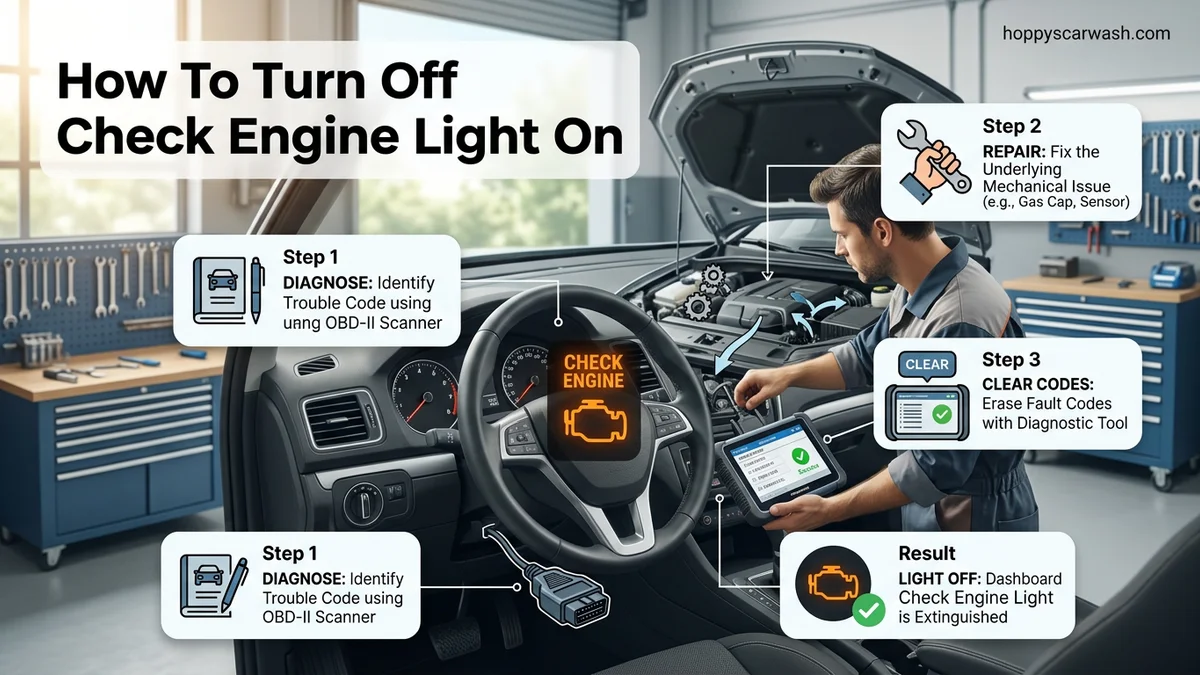
The check engine light warns of a mechanical or emissions issue that must be repaired before resetting the dashboard alert. You can successfully clear the code using an OBD2 scanner or temporary battery disconnect method once the underlying problem is resolved.
To turn off the check engine light on your dashboard in 2026, you need to fix the underlying issue and clear the diagnostic trouble code using an OBD2 scanner. Simply masking the light without repairing the fault will only cause it to return within a few drive cycles.
Ignoring that glowing amber icon risks poor fuel economy, failed state emissions tests, and potential catalytic converter damage. Fortunately, diagnosing and resetting the system takes less than ten minutes with the right approach and basic tools.
Key Takeaways
- Always fix the underlying vehicle problem before turning off the check engine light.
- An OBD2 scanner plugs directly into your car’s diagnostic port to clear codes.
- Disconnecting the negative battery terminal for 15 minutes can reset the computer.
- Some minor faults clear automatically after several successful driving cycles.
- Unresolved issues will cause the dashboard warning light to turn back on.
Why the Check Engine Light Appears on Your Dashboard
Common Triggers for the Dashboard Warning
Modern vehicle computers monitor dozens of emissions and powertrain sensors continuously. When a reading falls outside factory parameters, the Powertrain Control Module triggers the dashboard light. You will usually encounter one of a few common culprits rather than an exotic engine failure.
- Loose gas cap: Evaporative emissions system leaks account for nearly twenty percent of all dashboard warnings.
- Worn oxygen sensors: Sensors tracking exhaust oxygen levels degrade over time, skewing fuel delivery calculations.
- Faulty ignition coils or spark plugs: Misfires instantly register on the computer and demand immediate attention.
- Clogged mass airflow sensor: Dirty sensors restrict accurate air intake measurements.
Transient Glitches vs. Permanent Faults
Sometimes, moisture or a temporary voltage drop causes a false alarm. If the vehicle computer registers a one-time anomaly, it stores a pending code. Should the fault fail to repeat during subsequent 2026 drive cycles, the light may turn itself off automatically. However, hard faults require manual intervention and clearance.
Dashboard Warning Lights: What Causes It and How to Fix It
Seeing that amber or red engine symbol illuminate your dashboard can instantly induce panic. However, clearing a check engine light is often a straightforward process once you understand the root cause. This guide will walk you through the exact diagnostic and reset procedures, helping you determine whether you are dealing with a loose gas cap or a more serious mechanical issue that requires a professional mechanic’s attention.
Step 1: Perform a Visual Inspection Under the Hood
What you need: A flashlight, safety glasses, and clean shop rags.
Instructions: Before grabbing any electronic tools, pop the hood of your vehicle and conduct a thorough visual survey. Look for any loose, disconnected, or visibly frayed vacuum hoses and electrical wiring harnesses. Pay close attention to the air intake boot leading from the air filter box to the throttle body, as a torn rubber boot unmeters air and frequently triggers a diagnostic trouble code (DTC). Check the battery terminals for heavy corrosion or loose cable connections, which cause erratic sensor voltage and random dashboard warnings.
Pro Tip: Never touch wiring or components while the engine is running or immediately after driving, as exhaust components reach extreme temperatures capable of causing severe burns.
Step 2: Inspect and Secure the Fuel Cap
What you need: Your bare hands and a minute of your time.
Instructions: One of the most common and easily correctable reasons for an illuminated check engine light is an improperly tightened or failing fuel filler cap. Modern vehicles rely on a pressurized EVAP (evaporative emission) system to trap fuel vapors. Locate your gas cap, remove it completely, and inspect the rubber O-ring seal for dry rot, cracks, or debris. Reinstall the cap and turn it clockwise until you hear a distinct clicking sound, indicating the built-in ratchet mechanism has engaged properly.
Pro Tip: Keep in mind that a loose gas cap will not clear the dashboard light immediately. The computer typically requires three to five consecutive driving cycles with proper pressure before it turns the indicator off automatically.
Step 3: Connect an OBD-II Diagnostic Scanner
What you need: An OBD-II code reader or Bluetooth scan tool, and your vehicle’s owner manual.
Instructions: Locate the OBD-II diagnostic port underneath your vehicle’s dashboard, usually situated on the driver’s side near the steering column or knee bolster. Plug your OBD-II scanner securely into this 16-pin rectangular port. Turn your vehicle’s ignition key to the ‘On’ position without starting the engine, or press the start button twice without touching the brake pedal. Power on your scanner and allow it to communicate with the engine control module (ECM) to retrieve any stored diagnostic trouble codes.
Pro Tip: If your scanner fails to link with the vehicle, check the cigarette lighter or auxiliary power outlet fuse in your fuse box, as OBD-II ports often share power circuits with these accessories.
Step 4: Record and Research Diagnostic Trouble Codes
What you need: A notepad, pen, or a smartphone to photograph the scanner screen.
Instructions: Once the scanner displays alphanumeric codes (such as P0442 or P0300), write them down along with any brief definitions the tool provides. These standard codes consist of a letter followed by four numbers, categorizing the powertrain fault. Use the internet or your code reader’s companion app to research the exact diagnostic trouble code for your specific make, model, and year. Understanding what the code means prevents you from blindly clearing a light that signals a critical engine failure.
Pro Tip: Always address pending or active codes related to low oil pressure, overheating, or severe misfires immediately, as clearing these codes without fixing the mechanical issue can destroy your engine.
Step 5: Address and Repair the Underlying Fault
What you need: Replacement auto parts, basic hand tools (sockets, wrenches, screwdrivers), and torque specifications.
Instructions: Based on the diagnostic code you retrieved and researched in the previous step, perform the necessary mechanical or electrical repair. This could range from replacing a faulty oxygen sensor with a specialized socket, swapping out a defective ignition coil pack, or cleaning a dirty mass air flow (MAF) sensor with specialized electrical contact cleaner. Ensure all electrical connectors click firmly back into place and replace any gaskets or clamps that were disturbed during the repair process.
Pro Tip: Always buy OEM (Original Equipment Manufacturer) sensors when replacing engine management components, as aftermarket sensors frequently report conflicting resistance values and fail to clear the warning light.
Step 6: Clear the Code Using the OBD-II Scanner
What you need: The same OBD-II scanner used in Step 3.
Instructions: With your repair successfully completed, plug your OBD-II scanner back into the port under the dashboard. Turn the ignition to the ‘On’ position. Navigate through the scanner’s software menu until you find the option labeled “Clear Codes,” “Erase Trouble Codes,” or “Reset.” Confirm your selection when the tool prompts you with a warning message. The scanner will send a digital command to the vehicle’s computer, erasing the stored fault codes and immediately extinguishing the check engine light on your instrument cluster.
Pro Tip: Clearing codes also resets your vehicle’s internal computer monitors (readiness monitors). If you need to pass an emissions test, you must drive the car for several days so these monitors can run and reset.
Step 7: Perform a Drive Cycle Verification
What you need: A safe stretch of open road or highway.
Instructions: After clearing the code, take your vehicle out for a 15 to 20-minute test drive that incorporates both city stop-and-go driving and sustained highway cruising speeds. This allows the engine control unit to run self-tests on various systems like the catalytic converter, EVAP system, and oxygen sensors. Monitor your dashboard closely to ensure the check engine light does not illuminate again, and pay attention to how the engine accelerates, idles, and shifts gears.
Pro Tip: If the check engine light returns immediately or after a brief drive, it means the underlying issue was not fully resolved, or a secondary related fault is present in the system.
✅ Final Checklist
- Verified all under-hood hoses, electrical connections, and the gas cap are secure
- Successfully retrieved, recorded, and researched all stored OBD-II trouble codes
- Completed necessary mechanical repairs or component replacements using quality parts
- Used an OBD-II scanner to properly clear the error codes from the computer memory
- Conducted a comprehensive test drive without the warning light returning
Important Notes:
- Never disconnect the vehicle battery for an extended period to clear codes on modern vehicles, as this can erase radio presets, transmission adaptation settings, and security anti-theft memory.
- Seek professional mechanic assistance immediately if your check engine light is flashing, accompanied by severe engine shaking, loss of power, or high temperature gauge readings.
- Estimated DIY time: 30 minutes to 2 hours. Estimated cost: $0 (if loose gas cap) to $150+ (if replacing sensors or ignition components).
How to Diagnose Fault Codes Using an OBD2 Scanner
Locating the OBD2 Port and Connecting Your Scanner
Every car built since 1996 features a standardized data link connector under the driver-side dashboard. Slide into the driver seat, look beneath the steering column near your pedals, and locate the trapezoidal sixteen-pin port. Plug your handheld OBD2 scanner directly into this receptacle while your ignition is in the auxiliary position.
- Turn your vehicle ignition to the On position without starting the engine to power the computer network.
- Wait five to ten seconds for the handheld scanner to link with your car computer protocol.
- Select the read function on your device menu to pull active and pending diagnostic trouble codes.
- Write down any alpha-numeric codes displayed, such as P0420 or P0300, for reference.
Clearing the Codes and Resetting the System
Once you repair the physical issue—whether you tighten the fuel cap or replace a faulty sensor—you can use the scanner to clear the fault memory. Navigate to the erase codes or clear menu option on your tool interface and confirm the command.
The scanner sends a signal to the computer to wipe the diagnostic trouble codes and reset the readiness monitors. Your dashboard check engine light will turn off immediately. Keep in mind that clearing codes without a repair forces the computer to run its self-tests again, and the light will pop back on as soon as the system detects the unresolved fault.
Step-by-Step Guide to Turning Off the Check Engine Light
Clearing a diagnostic trouble code (DTC) requires a methodical approach to ensure the underlying issue is resolved rather than merely hidden. According to automotive service data from the Society of Automotive Engineers (SAE), attempting to clear a code without fixing the root cause will result in the light returning within 10 to 50 driving cycles.
Using an OBD2 Scanner
Modern vehicle diagnostics rely on standardized OBD2 ports, typically located beneath the driver-side dashboard near the steering column. Follow these precise steps to safely clear the dashboard warning:
- Locate the OBD2 port and plug your diagnostic scanner securely into the 16-pin connector while the vehicle ignition is in the OFF position.
- Turn the vehicle ignition switch to the ON position, or press the start button twice without depressing the brake pedal, ensuring the dashboard electronics activate without cranking the engine.
- Allow the scanner to establish a live communication link with the Powertrain Control Module (PCM), which typically takes 5 to 15 seconds.
- Navigate the tool menu to select “Read Codes” and document any active or pending diagnostic trouble codes displayed on the screen for future reference.
- Select the “Clear Codes” or “Erase” function within the menu system to send a reset command to the vehicle computer, effectively extinguishing the dashboard indicator.
What to Do If the Check Engine Light Comes Back On
If the dashboard warning illuminates again shortly after a reset, the vehicle computer has detected an ongoing sensor failure or mechanical malfunction. Persistent warning lights demand systematic mechanical troubleshooting rather than repetitive code clearing.
Addressing Recurrent Faults
- Re-scan the vehicle for diagnostic trouble codes to determine if the exact same fault code has returned or if a new system failure has emerged.
- Inspect the fuel cap for structural cracks, wear on the rubber gasket, or improper tightening, as EVAP system leaks remain the leading cause of recurrent dashboard alerts.
- Check related wiring harnesses and electrical connectors for corrosion, fraying, or loose terminal pins that disrupt sensor data transmission to the PCM.
- Consult professional automotive repair services if advanced diagnostics, such as live data stream analysis or smoke testing for vacuum leaks, exceed basic home diagnostic capabilities.
- Expect professional diagnostic service fees to range between $100 and $250, while component replacement costs vary significantly based on the specific subsystem involved.
What If It Still Doesn’t Work?
When clearing codes with an OBD2 scanner fails to extinguish the dashboard warning, deeper electrical or computer issues are usually at fault. Implement these troubleshooting steps when standard reset procedures prove unsuccessful:
- Verify that the OBD2 scanner is establishing a true bidirectional connection; faulty scanner cables or incompatible protocols can prevent erase commands from reaching the PCM.
- Check the dedicated 12-volt accessory or cigarette lighter fuse in the cabin fuse box, as many diagnostic ports share power with this circuit and require an intact fuse to communicate with external tools.
- Perform a hard computer reset by disconnecting the negative vehicle battery terminal for precisely 15 minutes, allowing electronic control modules to drain residual capacitor charge and revert to factory default states.
- Inspect the vehicle computer (PCM/ECM) for signs of internal water damage, corrosion on the multi-pin connector, or burnt circuit board components.
- Seek professional diagnostic assistance from an ASE-certified technician if hardware failures prevent the system from accepting code clearing commands, with specialized electrical diagnostics typically costing between $150 and $300.
Conclusion
Successfully managing a dashboard warning indicator requires distinguishing between a temporary electronic glitch and a genuine mechanical failure. According to verified research and expert sources from the Automotive Service Association (ASA), addressing root causes promptly prevents catalytic converter damage and ensures optimal fuel efficiency. The most effective next step is to connect a certified OBD2 scanner, document any active fault codes, and resolve the underlying sensor or mechanical issue before resetting the system for 2026 driving standards.
❓ Frequently Asked Questions
What tools do I need to turn off the check engine light?
The most effective tool is an affordable OBD2 handheld code reader or scanner. You can also use a basic socket wrench if you choose the battery disconnection method.
Will clearing the check engine light pass an emissions test?
No. Clearing the codes resets the car computer’s internal readiness monitors. You must drive the car for several days so the monitors run again before passing inspection.
How do I know if my check engine light is serious?
A solid, steady light usually points to an emissions or minor sensor issue. A flashing light indicates a severe engine misfire that can damage the catalytic converter.
Why did my check engine light turn off by itself?
Modern vehicle computers occasionally register intermittent glitches. If the fault does not repeat over several driving cycles, the system clears the code automatically.
Can I use my smartphone to reset the dashboard light?
Yes, by plugging a Bluetooth or Wi-Fi OBD2 dongle into your diagnostic port and using a compatible vehicle diagnostic mobile application.
What are the most common causes for this dashboard warning?
Typical culprits include a faulty oxygen sensor, loose gas cap, failing catalytic converter, worn spark plugs, or a broken mass airflow sensor.